TalentLynk features

Calling, messaging and AI.
Built around recruitment.

Connect every conversation. Capture the useful details. Give your team more time to recruit.

Less manual adminA connected CRMBetter team visibility
Conversation → CRM
TalentLynk suggests editable CRM updates from a recruitment conversation
Useful details. Ready to review.Your recruiter makes the final call.
Actual TalentLynk interface · Demo data · Tap to enlarge

Connected to the CRM your agency uses.

BullhornVincereMercuryJobAdderLoxoFirefishSpottSalesforce
Explore integrations

01 / Recruitment calling

A better call starts
with the right context.

Call from your CRM, keep recordings close, and guide every conversation with your agency's own questions.

Find your CRM
Click-to-call

Start a conversation from the record you are viewing.

Recordings & transcripts

Revisit the details when you need them.

Custom call guides

Keep screening calls and client briefs consistent.

Desktop & mobile

Keep your conversations connected wherever you work.

02 / Smart Inbox

Every channel.
One conversation.

CallingEmailWhatsAppSMSTeams

Pick up where the conversation left off, with messages, calls and contact history together.

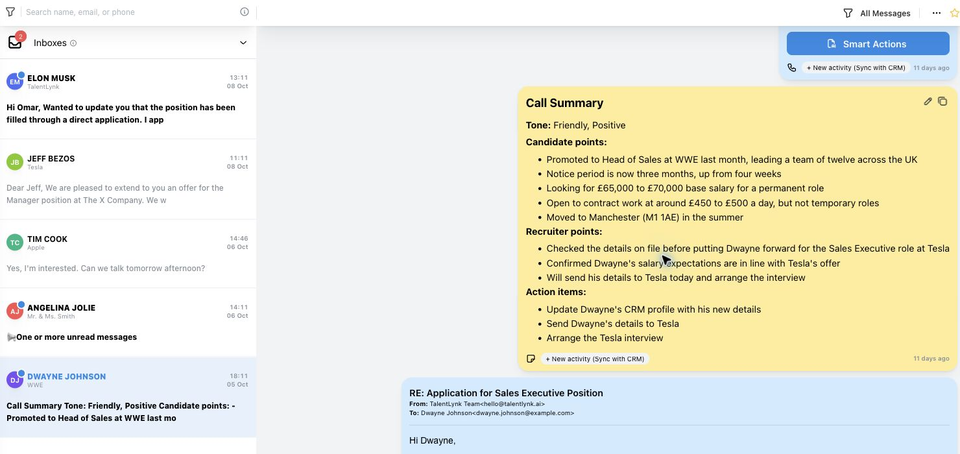
Dwayne Johnson’s demo conversation with calls, messages and AI notes in the TalentLynk Smart Inbox
A connected conversation in TalentLynk · Demo data
Shared conversation historyAI suggested repliesReusable message templates
Explore WhatsApp for recruitment

03 / AI workflows

Great conversations.
Useful work, already started.

Turn calls and Teams meetings into notes, next steps and suggested CRM updates. Tailor the outputs to your agency.

Explore a recruitment conversation workflow

Capture the details

Stay in the conversation.

Focus on the person. TalentLynk keeps the transcript ready for what comes next.

Explore AI call notes
DJDwayne Johnson
Screening call · Illustrative excerpt
“I'm now Head of Sales. My notice is three months, and I'm looking for £65,000–£70,000.”

Make it useful

The key points.
Already organised.

Create clear notes and next steps, in the structure your team works with.

Screening notesClient briefsCustom automations
AI call summary showing candidate details and action items from Dwayne’s demo call

Bring it back to your CRM

Review. Refine.
Put it to work.

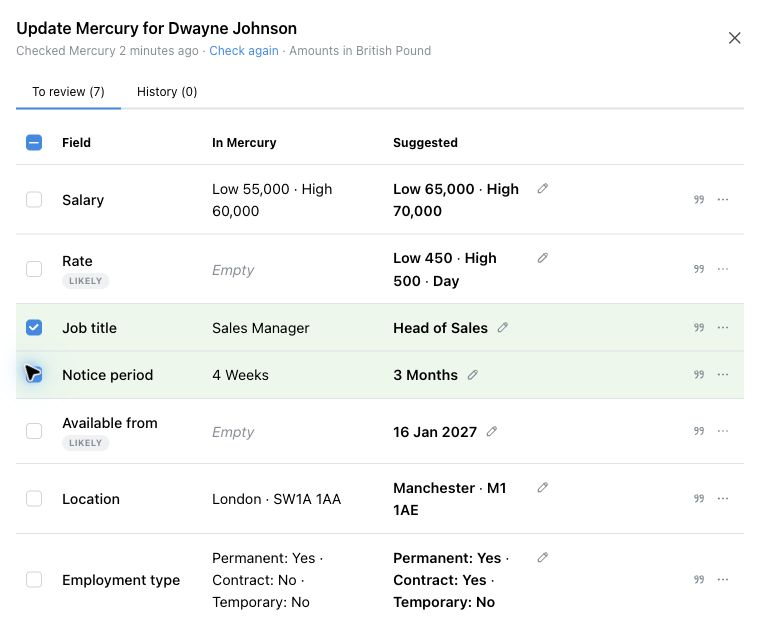
See suggested changes beside existing CRM values. Edit the details and choose what to apply.

Explore AI CRM updates
Existing and suggested CRM fields, with review and editing controls
Explore each step aboveProduct screenshots and illustrative demo data

04 / CRM updates

A richer CRM.
With you in control.

Turn conversation details into suggested field updates. Keep your agency's records useful, without retyping the same information.

  • Compare current and suggested values.
  • Edit suggestions to get the details right.
  • Choose the changes you want to apply.
See how CRM updates work
Recruiter reviewing job title, notice period, salary and other suggested CRM updates in TalentLynk
ReviewEditApply
Actual TalentLynk interface · Demo data
“The product is saving our recruiters a lot of time, and it immediately syncs with Bullhorn.”
Nick BamberDirector & Founder
Bamber Education

05 / Campaigns

Reach the right people.
Keep replies connected.

Personalise SMS and WhatsApp campaigns, reuse templates and track responses in TalentLynk.

Candidate outreachIllustrative example
Hi {first_name},
A new role has come up that could be a great fit. Would you like the details?
PersonaliseMake it relevant
SendSMS or WhatsApp
Track repliesKeep the context
Reusable templatesScheduled messagesDelivery & reply tracking

06 / Team visibility

See the activity.
Support the team.

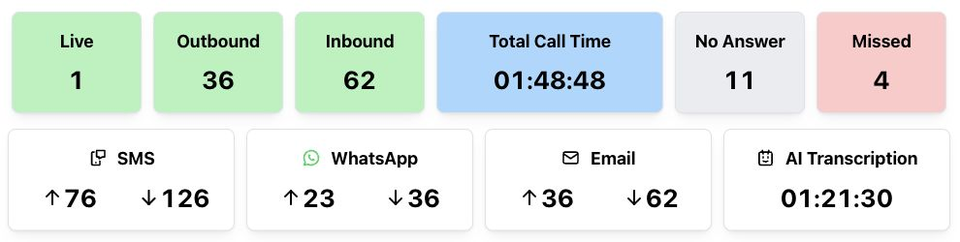
Bring calling, messaging and AI activity into view. Spot missed calls and understand how your team works.

TalentLynk dashboard showing live calls, call time, messages and AI transcription activity
Actual TalentLynk dashboard · Demo data
Team activity reportsCall monitoringAI automation reporting
Connect your reporting with OneUp

Fits around your agency

Keep the CRM you know.
Connect the conversations.

Explore how TalentLynk works with your recruitment CRM.

View all integrations

A few useful answers

Your agency.
Your way of working.

Can TalentLynk replace our phone system?

Yes. TalentLynk brings cloud calling, recordings, messaging and CRM-connected conversations together for recruitment agencies.

Can we customise the AI outputs?

Yes. Tailor instructions, sections and templates around your screening calls, client briefs and other recruitment workflows.

Can recruiters edit suggested CRM updates?

Yes. Review the existing and suggested values, refine the details, and choose which changes to apply.

Does it work with Microsoft Teams?

Yes. Bring Teams meeting transcripts into your AI workflows for structured notes and useful follow-up details.

How do we get started?

Book a demo and bring your CRM and workflow questions. We will show how TalentLynk fits your agency.

See your agency's workflow
in TalentLynk.

Your CRM. Your conversations. A demo built around your team.